Media Kits
How to Make a Media Kit: 5 Steps, One Complete Example
One finished sample kit, built section by section: numbers, positioning, past work, rates, and a link that keeps itself current.
Below is one complete media kit, built step by step. The creator, Ryan Cole, is a demo — his numbers are sample data — so focus on the structure: which sections a kit needs, in what order, and what each one has to say.
The finished kit, top to bottom
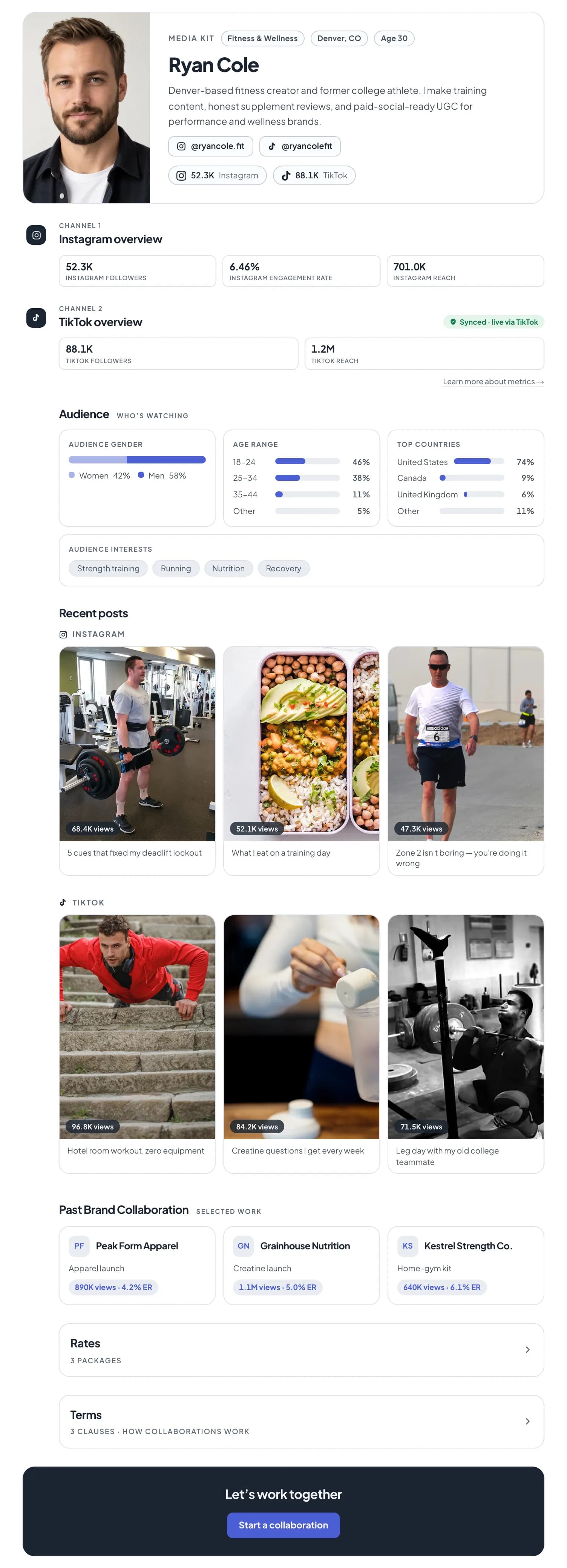
Step 1: Add your numbers, per platform
Take each figure from the platform's own analytics, never one combined total, and say where it came from.
| Number | Where to get it |
|---|---|
| Follower count | The platform's own profile view |
| Engagement rate | Calculated from your recent posts — try the engagement rate calculator |
| Reach | Instagram: Insights → last 30 days. TikTok: analytics overview |
| Audience gender / age / country | Instagram: Insights → Total audience (Creator or Business account). TikTok: Followers tab |


Step 2: Write one positioning line
What you make, and which brands it is for — specific enough that a brand could rule you out. "Lifestyle creator sharing my journey" rules nobody in.

Step 3: Show past work, with results
Three pieces: the brand, what the campaign was, what it did. No paid work yet? Use your best organic posts on the subject a brand would hire you for.

Step 4: Package your rates
Packages, not a price list: deliverables, turnaround, revisions and a starting price. Keep usage rights and exclusivity in your terms. The rate calculator shows the arithmetic behind a starting number.

Step 5: Share a link, not just a file
A PDF
- Accurate on export day, drifting after
- Every update means re-sending it
- Good as an attachment backup
A hosted link
- Re-reads its own numbers
- One URL, current whenever it is opened
- Forwarded internally without going stale
Send the link; keep a PDF for the rare brand that asks for a file. More finished layouts are in media kit examples.
Where KitVerify fits
The sample above is a KitVerify kit. Paste your Instagram handle into the media kit generator and step 1 is filled in from the official API, labelled Synced; you write steps 2 to 4 and pick a theme. No account needed: you get a live link straight away, which stays up for 30 days unless you sign up to keep it. A PDF export comes with a paid plan. KitVerify does not find brand deals or handle contracts — it builds the kit and keeps it current.
Related questions
How do I make a media kit for free?
Design one yourself in a free layout tool and type your numbers in by hand, or use a generator that reads your public numbers — KitVerify's builds a live link from your handle without an account (PDF export is on the paid plans). Either way the positioning line, past work and rates are yours to write.
Is creating a media kit different from making one?
No. "Create", "make" and "build" a media kit are the same job and the same five steps. What differs is the format you end up with: a designed PDF, a page you host yourself, or a link from a tool that keeps its numbers current.
What should a media kit include?
A positioning line, your numbers per platform, your audience breakdown, past work with results, rates as packages, and a way to contact you. Recent posts help if you have no brand work yet.
How long should a media kit be?
One to two pages as a PDF; as a link, one scroll in the order above. Length matters less than order: the audience and rates should never be buried under padding.
How often should I update my media kit?
Monthly by hand, which in practice means quarterly. A kit built as a link that re-reads its own numbers needs updating only when your positioning, work or rates change. Either way, show when the numbers were last pulled.
KitVerify
Build yours from your handle.
Paste your Instagram handle and your numbers arrive labelled Synced. Write the rest, pick a theme, and share a link that keeps its own numbers current.
About the author
Dennis Tjahyadi · Founder, KitVerify
KitVerify is being built around the workflows of talent managers and creator agencies. This blog documents what we are learning about how those teams organize, maintain and pitch their talent — from product research, conversations with managers, and observing real workflows, not from having managed talent ourselves.
Related reading
- Media KitsMedia Kit Examples: What the Good Ones Actually Have in CommonMost media kit examples you find are design templates. This one is about structure: which sections earn their place, what a brand reads first, and how the right shape changes as your audience grows.
- Media KitsThe Instagram Media Kit: Which Numbers, and Where They LiveInstagram gives you more metrics than belong on a kit. Which ones a brand actually reads, where to find each in the app, and the two that look impressive while telling a partnerships manager nothing.
- Media KitsInfluencer Media Kit Template: The Shape, Written Out in FullEvery section of a working media kit, with the exact prompts to fill each one — copyable into any tool you like. And an argument about why the template was never the hard part.
- Media KitsWhat Is a Good Engagement Rate on Instagram? Benchmarks by Follower Count (2026)There is no single good Instagram engagement rate — it falls as accounts grow. The tier averages, the thresholds for good and excellent, and how to work out your own rate without one viral post skewing it.